 Crates
v0.4.0 · macOS
Crates
v0.4.0 · macOS
Crates
Pull samples straight from the source.
A desktop sample digger for music producers. Grab audio from a link, sort it into crates, audition it in the built-in player, and drag it straight onto a track.
See it in action
Cratesv0.4.0 · macOS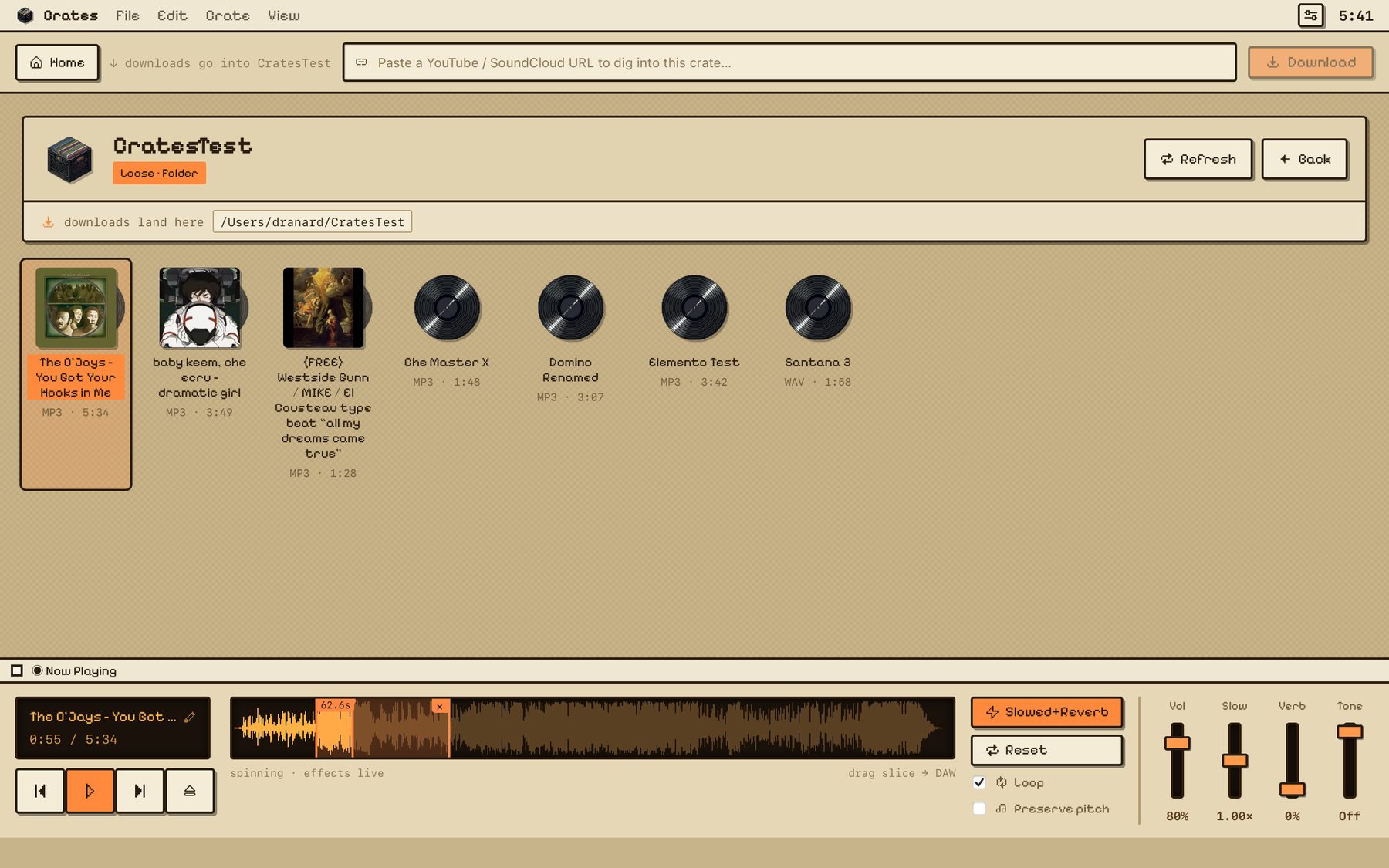
Your library as a wall of records — cover art pulled from every file — with a built-in deck to audition, time-stretch, and flip the next sample.
NEW What's new in v0.4.0
✂️
Slice & drag out a sectionSelect any part of a sample's waveform and drag just that slice onto your DAW track — not the whole song. Zoom in for precise edits, fine-tune the in/out handles, and loop-preview the selection before you commit.
🎚️
Your effects, baked inDrag out the slowed / reverb / tone sound you hear, or the dry original — your call per slice.
🖼️
A fresh coatNew crate-logo app icon, plus cover-art, trash, and library polish under the hood.
What you get
🔗
Download from a linkPaste a URL, get a clean audio file. yt-dlp + ffmpeg ship inside the app, so there is nothing else to install.
🗂️
Dig through cratesOrganize everything into crates and rooms, the way you would flip through a record bin.
🎧
Audition before you commitA built-in player with waveform scrubbing and time-stretch, so you can vibe-check every sample.
🎛️
Drag into your DAWDrag any sample out of Crates and drop it straight onto an Ableton track or into Finder.
SETUP Install in 3 steps
- Download & open the .dmg, then drag Crates into your Applications folder.
-
Clear the quarantine flag. Crates is not yet signed by Apple, so macOS will block the first launch (“Crates is damaged” or “unidentified developer”). Open Terminal and run this once:
$xattr -dr com.apple.quarantine /Applications/Crates.appThis just removes the “downloaded from the internet” tag. It does not change the app. - Open Crates from Applications (or Launchpad). It opens normally from now on.
No Terminal? Right-click (or Control-click) Crates in Applications → Open → Open in the dialog. On recent macOS the command above is the reliable route.
Why the extra step? Crates isn't signed with an Apple Developer ID yet, so macOS quarantines apps that didn't come from the App Store. Clearing the flag is a one-time thing — a signed, Apple-notarized build is on the way.
LOG Release notes
v0.4.0Jun 23, 2026Waveform slicing & drag-out
- Slice & drag out a section — select any part of a sample's waveform and drag just that slice onto a DAW track, not the whole song. Slice mode, in/out trim handles, loop-preview, and zoom for precise edits.
- Effects baked in — drag out the slowed / reverb / tone sound you hear, or the dry original.
- New crate-logo app icon, plus cover-art, trash, and library polish.
v0.3.0Jun 16, 2026Faster, lighter frontend
- Rebuilt the interface on Vite + React for a snappier, more reliable app — no more first-load hitches.
v0.2.0Jun 15, 2026The crate-shelf rewrite
- A ground-up redesign — your library as crates, with auto-organized Rooms for Ableton projects.
- New glitch-free audio engine: smooth time-stretch / slow while you drag, with preserve-pitch, reverb, and tone.
- Contextual downloads (into whichever crate you're in) and a streamlined Settings.
Full technical changelogs live on GitHub Releases.